

BET939 App Download offers Speed APP, Native App and Quick APP options for members to choose before downloading. BET939 displays file sizes and an Auto login option in the application window. Players in Pakistan should distinguish downloading, completing setup and successfully signing in. This app download guide explains the process and the specific reward conditions associated with the download task.
Available Versions for BET939 App Download
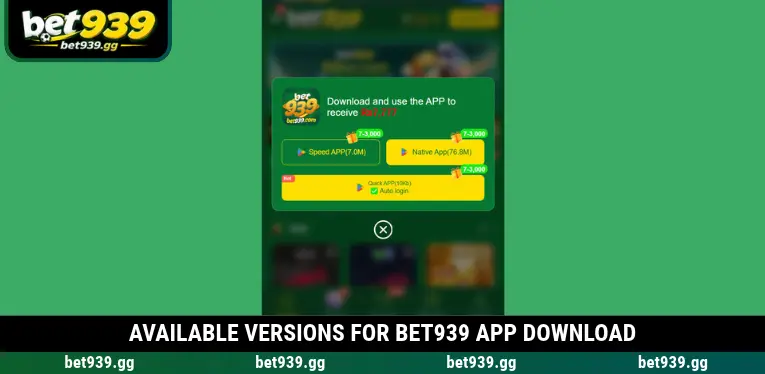
The BET939 App Download window presents three options with different displayed sizes. BET939 identifies each version separately, allowing you to check its name and accompanying information before proceeding. Do not assume that the smallest option is automatically the most suitable for your device or intended use.
| Option | Displayed information and considerations |
| Speed APP | Displays a size of 7.0M. Check the instructions opened after selecting it; do not infer its features or operating speed from the name alone. |
| Native App | Displays a size of 76.8M, larger than the other two options. Check available storage and the actual file information before continuing with installation. |
| Quick APP | Displays 10Kb, a Hot label and an Auto login option. Read the setup instructions and consider whether automatic sign-in is appropriate for the device being used. |
Important Checks Before Downloading and Using the App
Completing BET939 App Download includes checking the file and protecting account access. BET939 encourages members to prepare their device, have the correct account information available and review requests before proceeding, rather than accepting every notification without understanding its purpose.
- Use the platform’s download button: Start from the application section provided on the platform. Do not assume that files displaying the same logo are identical versions or originate from the same source.
- Check available device storage: The displayed size helps you assess storage requirements before downloading. If space is insufficient, address the storage issue rather than repeatedly downloading the same file.
- Keep login information private: Do not give someone your password to complete setup on your behalf. When assistance is needed, explain the error instead of sharing authentication details.
- Review requested permissions: Read each notification before granting access. If the purpose of a request is unclear, pause and ask support for clarification rather than accepting it automatically.
- Assess reward conditions beforehand: Promotional amounts should be considered alongside their requirements. Leave the task unused if completing its conditions would exceed your budget or keep you playing after you want to stop.
Step-by-Step Instructions for BET939 App Download

Begin with Download now on the BET939 application banner. The following process distinguishes choosing a version, downloading and accessing an account. Pressing the download button alone does not confirm that setup has finished or that the intended member account is ready to use.
Step 1: Open the Application Download Window
Start BET939 App Download using Download now on the platform. Check that the window presents Speed APP, Native App and Quick APP before continuing. Avoid downloading through unsolicited invitations or files sent privately by someone you do not know, even if the file name appears familiar.
Step 2: Choose the Version You Want to Use
Read the name, displayed size and instructions for the option you are considering. BET939 provides separate information for each choice. If selecting Quick APP, review Auto login before confirming, particularly when another person also uses the device or regularly borrows your phone.
Step 3: Monitor the Download Process
During BET939 App Download, follow the notifications from your browser or operating system. If a file downloads, wait for completion and check its name and source before opening it. Avoid opening several copies when you have not established whether the previous download has finished.
Step 4: Follow the Instructions on Your Device
Open the file or continue according to your selected option, reading the requests displayed on the screen. If your device reports incompatibility or raises a security warning, stop and investigate. Do not disable protective features simply to force the installation process to continue.
Step 5: Open the App and Check Account Access
After BET939 App Download, open the option you have set up and check the account being used. Sign in with your existing details if requested. Treat the process as complete only when the correct account is accessible, rather than assuming a completed download also means successful login.
Checking Your Account After BET939 App Download

After completing BET939 App Download, review the displayed account information before making a transaction. BET939 encourages members to compare the name or identifying details with their intended account, especially when the browser or device has previously been used to access another member account.
Consider Auto login according to how the device is managed. Players in Pakistan should avoid enabling it merely to reduce steps if their phone is frequently shared. If an unexpected account opens, stop using it and clarify the situation before changing information or carrying out transactions.
Rewards Associated with the BET939 App Download Task
BET939 presents a reward range of Rs7–3,000 for downloading the application and signing in to an account. This benefit is linked to the task and promotion conditions, rather than being a fixed payment received simply for downloading. Review the relevant requirements before choosing to participate.
| Item | Conditions associated with the app task |
| Required task | Download the application and sign in to your account. Pressing the download button or saving a file alone does not complete both actions. |
| Reward range | The advertised range for this task is Rs7–3,000. It does not mean that every eligible member receives the highest amount. |
| Withdrawal requirement | The bonus must be wagered 25 times before withdrawal under the promotion’s conditions. |
| Qualifying bets | Only slot bets count towards the requirement. Do not assume activity in every gaming category contributes. |
| Participation eligibility | The promotion is directed at new members, with one participation per member. Duplicate accounts are not eligible. |
| Receiving account information | Bank account details must not be changed before the first withdrawal. Changes may result in forfeiture of the bonus. |
Checking the Version When an Update Is Needed
If an update notification appears or download choices change, return to the BET939 application section to check the current information. Do not identify an update solely by the name of a shared file, and avoid removing your existing version before ensuring you have the account details needed to regain access.
If BET939 App Download is interrupted or the application does not open, record the selected version, device and message displayed. These details make the situation clearer when contacting Customer Service. They provide a more useful explanation than reporting only that the app cannot be used.
Conclusion
BET939 App Download should begin through the platform’s download options, using a suitable version and the correct account details. BET939 encourages players in Pakistan to review the file, setup instructions and app reward conditions before proceeding. Choose the appropriate app download option, protect your login information and contact support if a warning appears or the process is unclear, rather than forcing installation.

Maya Ali is a lead gaming strategist and sports analyst at BET939, specializing in cricket exchange betting, live casino strategies, and slot games. Her guides provide Pakistani players with safe Easypaisa and JazzCash transaction tips alongside actionable betting insights to elevate their overall gaming experience. Follow her latest articles on BET939 to play smart, stay ahead of the game, and maximize your winning potential.