

Login BET939 lets members access an account using their registered phone number or username and password. BET939 also displays Google Quick login, a remember-details option and Forgot Password for access assistance. Players in Pakistan should check their chosen method, entered information and device before submitting. This login guide explains each step, common issues and practical ways to protect account access.
How to Complete Login BET939 Using Account Details
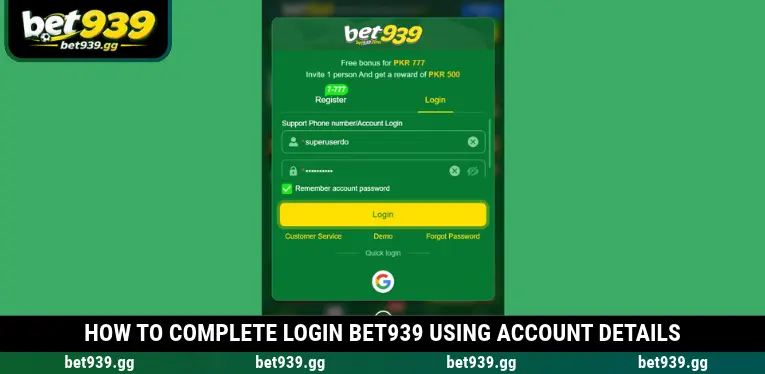
The BET939 account form includes Register and Login tabs, with Login intended for existing members. Select the correct tab, enter the corresponding details and review the available options before submitting your access request, particularly if the browser has already filled in information.
Step 1: Open the Correct Login Window
Visit BET939, open the account form and select Login rather than Register. Check that the phone number or account field and password field are displayed. If the window still shows new-account registration content, switch tabs before entering your details or attempting to continue.
Step 2: Enter Your Registered Account Information
When completing Login BET939, use the phone number or username associated with your registration. Do not assume that the nickname displayed in your profile is also your login name. Check the original account details and remove any spaces accidentally included when copying and pasting the entry.
Step 3: Enter and Check Your Password
Type your password into the field marked with a lock, checking uppercase letters, lowercase letters and special characters. BET939 provides an eye icon for reviewing the entry. Use it only when others cannot see your screen, then hide the password again before continuing.
Step 4: Review the Remember-Details Option
Check Remember account password before submitting. On a protected personal device, you can consider whether remembering details is appropriate. On a shared or borrowed device, deselect the option to reduce unwanted storage, and check whether the browser separately offers to save your login information.
Step 5: Submit and Confirm Account Access
Press Login after reviewing the information entered. Treat Login BET939 as complete only when the account opens or a confirmation is displayed. If a message appears instead, read it before trying again rather than repeatedly submitting the same details without identifying what needs attention.
Functions Available on the Account Login Form
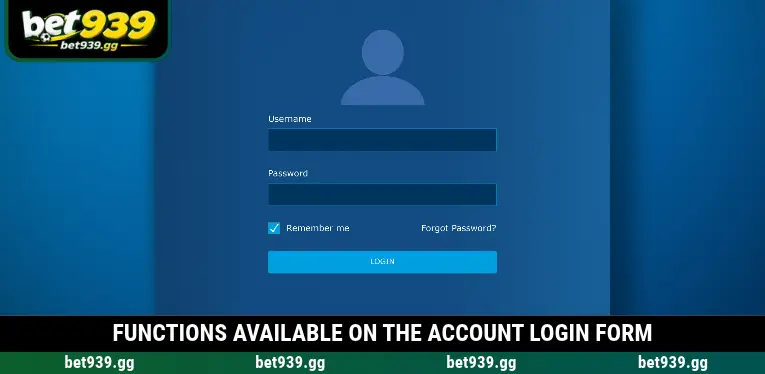
Alongside the main fields, BET939 provides controls for checking entries and accessing assistance. Players in Pakistan should distinguish between clearing information, revealing a password, contacting customer service and selecting Demo, as these functions do not all perform the same action.
| Function | How to use it |
| Remember account password | Controls whether account and password details are remembered. Review its selected state before signing in, particularly when using equipment shared with other people. |
| Eye icon | Shows or hides the password so you can compare characters. Avoid leaving the entry visible when another person could see the screen. |
| X inside an input field | Clears the corresponding entry so you can type it again. Distinguish this control from the button that closes the entire account window. |
| Customer Service | Opens an assistance option for account access questions. Prepare the error message and a description of the issue without sending your password. |
| Demo | A separate option on the form rather than the login confirmation button. Do not use this selection to determine whether your member account has opened. |
Using Google Quick Login for Login BET939
BET939 displays a Google icon beneath Quick login. When selecting this method, check the Google account being opened and follow the confirmation instructions. Pay particular attention if several Google accounts are already signed in through the same browser or device.
If you previously used Google to link an account, select the corresponding Google identity. Do not assume every Google account leads to the same member profile. If the connection is unclear, ask support before creating another account or changing information to resolve the confusion.
Restoring Access Through the Forgot Password Option
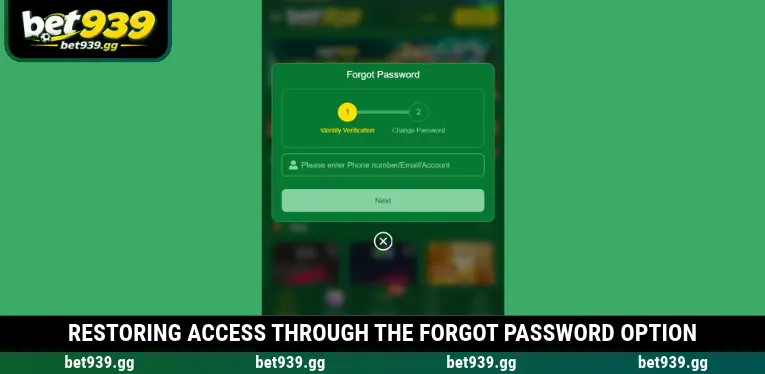
If you cannot remember the password for Login BET939, select Forgot Password rather than repeatedly trying old passwords. BET939 places this option beside Customer Service and Demo. Continue according to the fields and instructions displayed after opening it, without assuming which verification method will be required.
Provide information that belongs to you and is relevant to the recovery process. If you no longer control a required contact method, ask support about the appropriate next step. Do not use someone else’s details or send sensitive documents before understanding why they are needed.
Checking Common Reasons for Unsuccessful Account Access
If Login BET939 has not succeeded, review your information and actions before submitting again. BET939 provides password visibility, field-clearing and support options to assist with checking the situation. The appropriate response should follow the actual message displayed rather than an assumed explanation.
| Situation | What to check |
| Incorrect phone number or username | Compare the entry with your registration details. Avoid confusing it with your nickname and check for spaces at either end. |
| Password not accepted | Review uppercase letters, lowercase letters and special characters. Use Forgot Password if you cannot remember the correct entry. |
| Browser fills in old information | Check automatically completed fields. Clear the relevant entry and provide the details for the account you intend to access. |
| Google opens a different account | Review the selected identity and compare it with the Google account used previously. Do not confirm if the connection remains unclear. |
| The screen does not change after submission | Check your connection, displayed status and any message. Avoid repeated requests before establishing whether the previous attempt was recorded. |
Check Your Account After Successfully Signing In
After Login BET939, review your profile to confirm that you are using the intended account. BET939 includes identifying information in Profile. If the details differ from what you expected, stop before editing the profile or carrying out a transaction.
Players in Pakistan should also watch for changes they did not make. If something appears unusual, protect your access and contact support with a specific explanation. Avoid continuing to use the account as normal until the unexpected information or activity has been clarified.
Protect Your Information Whenever You Access an Account
Completing Login BET939 safely includes managing devices and authentication details. BET939 encourages members to maintain the habits below, especially when a browser can save information or a device is used by several people.
- Keep your password private: Do not share login details so someone else can operate the account. If the password has been exposed, change it rather than continuing to use the same credentials.
- Check stored information: Review remember-details settings on both the form and the browser. Avoid leaving account information on a device you do not control or cannot access securely.
- Sign out after use: End the session when using shared or borrowed equipment. Do not assume that closing a window has automatically signed you out of the account.
- Protect verification codes: Keep codes private if access or recovery requires verification. Do not forward them to another person or include them in a support conversation.
- Use the correct support channel: Select Customer Service or a contact option displayed on the platform. Explain the error requiring attention without providing a password as proof of account ownership.
Conclusion
Login BET939 requires the correct account information and an appropriate access method. BET939 encourages members to check entries before submitting, use Forgot Password when needed and avoid saving credentials on shared devices. Players in Pakistan should follow the login instructions, review their account after access and contact Customer Service if a message is unclear or the problem continues.

Maya Ali is a lead gaming strategist and sports analyst at BET939, specializing in cricket exchange betting, live casino strategies, and slot games. Her guides provide Pakistani players with safe Easypaisa and JazzCash transaction tips alongside actionable betting insights to elevate their overall gaming experience. Follow her latest articles on BET939 to play smart, stay ahead of the game, and maximize your winning potential.