

Deposit BET939 supports online payment options and USDT through the account interface. BET939 displays payment methods, amounts, promotional information and transaction status for review before payment. Players in Pakistan should distinguish a created order from a completed deposit and read the relevant reward conditions. This deposit guide explains the process, payment records and the information associated with each order.
Payment Methods Available for Deposit BET939
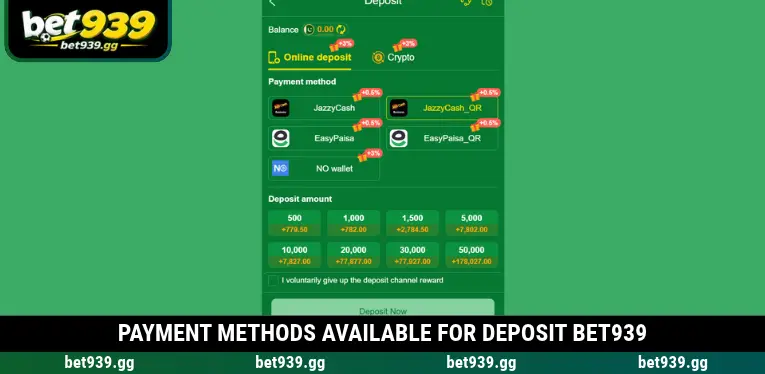
For Deposit BET939, choose between Online deposit and Crypto according to your payment requirements. BET939 provides separate instructions for each option. Players in Pakistan should check the selected channel and current payment details rather than assuming that every method follows the same process.
| Payment method | Available options and how to use them |
| JazzyCash | JazzyCash and JazzyCash_QR appear under Online deposit. Select the intended option and follow the payment information provided for the order created. |
| EasyPaisa | EasyPaisa and EasyPaisa_QR are displayed separately. Check the selected method before choosing an amount and continuing to the next stage. |
| NO wallet | Listed under Online deposit with its own reward badge. Read the instructions opened by this option rather than assuming another wallet’s procedure applies. |
| USDT | Available under Crypto with Solana, ERC20, BEP20 and TRC20 network choices. Match the selected network with the sending wallet and the order’s receiving information. |
Step-by-Step Instructions for Deposit BET939
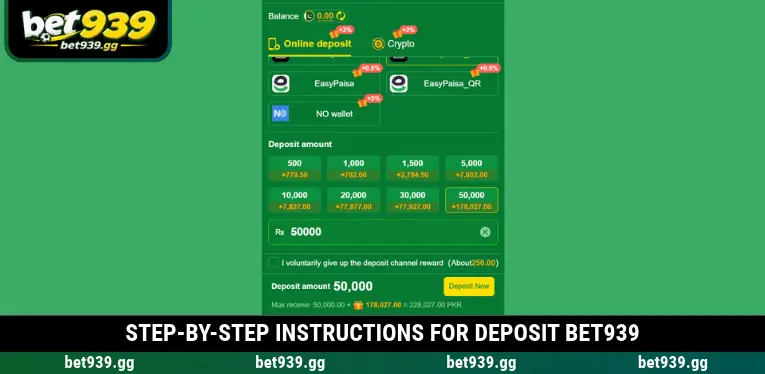
After signing in to BET939, open Deposit to choose a payment channel and create an order. The following process explains what to review at each stage, from selecting a method to checking the payment result, without confusing an order request with funds already credited.
Step 1: Open the Deposit Section
Begin Deposit BET939 by opening Deposit and confirming that you are using the intended account. BET939 displays Balance above the Online deposit and Crypto tabs. Choose the appropriate tab before entering an amount, ensuring that the selected method matches the payment you intend to make.
Step 2: Select the Payment Method and Network
When completing Deposit BET939, choose a wallet, QR option or USDT according to your requirements. The displayed Crypto minimums differ by network: 5 USDT for Solana, 20 USDT for ERC20, and 1 USDT for BEP20 and TRC20. Review the current limits before creating the order.
Step 3: Review the Amount and Promotional Options
Online deposit displays selectable amounts from 500 to 50,000 on the provided screen. BET939 also presents channel rewards and Deposit promotion information. Before submitting Deposit BET939, review the amount, applicable conditions and option to give up the channel reward; projected rewards are separate from the payment required.
Step 4: Create the Order and Check Its Details
Continue Deposit BET939 using Deposit Now once your selections are correct. In Deposit info, compare Deposit Method, Deposit amount and Order Number. The Deposit account field identifies the member account; do not confuse it with the payment recipient details provided during the payment stage.
Step 5: Complete Payment and Check the Result
Select Go to third-party if the order directs you to a payment provider, then follow its instructions. After Deposit BET939, open Deposit Records to review the status. Retain the receipt and order number, and avoid sending another payment simply because the balance has not changed immediately.
Promotional Information Displayed During Deposit BET939
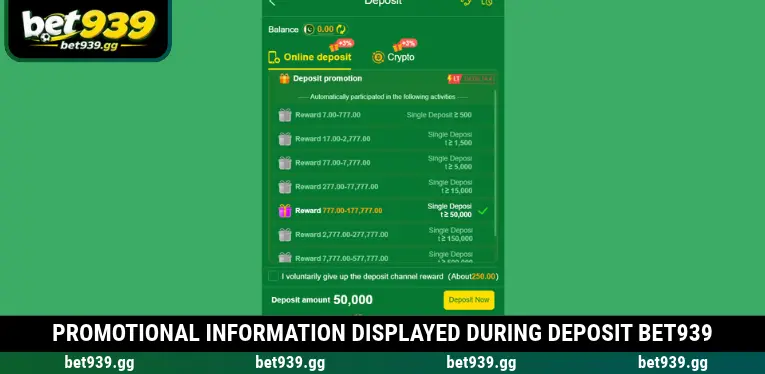
BET939 presents channel reward badges alongside reward ranges in Deposit promotion. The figures below relate to a single deposit amount, not a fixed reward guaranteed for every order. Read the applicable conditions to understand how rewards are determined, credited and used, and do not assume separate promotional figures are automatically combined.
| Single deposit amount | Displayed reward range |
| From 500 | 7.00–777.00 |
| From 1,500 | 17.00–2,777.00 |
| From 5,000 | 77.00–7,777.00 |
| From 15,000 | 277.00–77,777.00 |
| From 50,000 | 777.00–177,777.00 |
Tracking Deposit BET939 Through Payment Records

BET939 provides Deposit Records showing the method, amount, time, order number and status. Use the date filter and All Status selection to locate the relevant transaction. For a pending Deposit BET939 order, Wait to pay indicates an outstanding payment stage rather than confirmation that funds have reached the account.
Within Deposit info, Estimated gift and Estimated amount are projected values, distinct from the amount actually deposited and the balance credited. If your payment account has been charged but the order status remains unclear, compare the receipt and contact Customer Service before selecting Pay Now or initiating another transaction.
FAQs About Deposit Transactions
Before completing Deposit BET939, you may have questions about changing methods, reusing payment information or dealing with expired orders. BET939 addresses these additional situations below so you can check the relevant requirements before making a payment or taking another action.
Can I Change the Method After Creating a Deposit BET939 Order?
Do not switch payment channels while continuing to use the old order’s information. If you want another method, check how to end the unpaid request and create an appropriate order. If payment has already been made, contact support before taking further action.
Can I Reuse a QR Code from a Previous Deposit?
Do not assume that an old QR code or receiving details remain suitable for another deposit. Obtain the information associated with the latest order, as payment details may relate to a specific request rather than being reusable across every transaction.
Can I Pay Through a Wallet Registered to Someone Else?
Check the payment ownership requirements before using another person’s wallet. Do not assume a relative’s account is accepted. Prefer a method you control and ask support if the payer’s information differs from the details of the registered member.
What Should I Do If the Deposit Order Shows as Expired?
Do not continue transferring money against a request already marked as expired. Check whether a new order is required. If you paid before noticing the status, retain the receipt and ask support to reconcile the transaction instead of making another payment.
Can an Incorrect Amount or Wrong-Network Transfer Be Refunded?
Do not assume every incorrect payment can be refunded or adjusted. Stop further action, provide the transaction information to support and allow the circumstances to be checked. Do not send additional money in response to recovery promises from someone contacting you outside the platform.
Conclusion
Deposit BET939 should follow the method, amount and payment instructions associated with each order. BET939 encourages players in Pakistan to check the status, retain transaction references and distinguish deposited funds from projected rewards. Choose a suitable deposit method, read the promotional conditions and review the details before paying; if the status remains unclear, contact Customer Service for guidance.

Maya Ali is a lead gaming strategist and sports analyst at BET939, specializing in cricket exchange betting, live casino strategies, and slot games. Her guides provide Pakistani players with safe Easypaisa and JazzCash transaction tips alongside actionable betting insights to elevate their overall gaming experience. Follow her latest articles on BET939 to play smart, stay ahead of the game, and maximize your winning potential.