

Withdrawal BET939 requires members to set a withdrawal password and add a receiving account before submitting a transaction. BET939 displays JazzCash and Easypaisa options alongside balance and amount fields. Players in Pakistan should distinguish their withdrawal password from login credentials and check the receiving wallet before confirmation. This withdrawal guide explains the preparation and submission process.
Step-by-Step Instructions for Withdrawal BET939
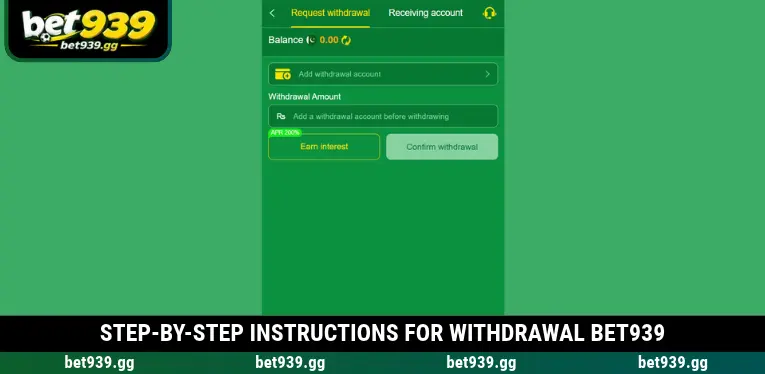
BET939 provides Request withdrawal for submitting transactions and Receiving account for managing payment destinations. Before proceeding, confirm that you are signed in to the intended account, prepare your personal wallet and complete the withdrawal password setup requested by the platform.
Step 1: Open the Withdrawal Section
Open Withdrawal BET939 and select Request withdrawal to view your balance and the transaction form. Check Balance before continuing. If you have not added a receiving account, the interface displays Add withdrawal account and asks you to provide the necessary information before withdrawing.
Step 2: Set Your Withdrawal Password
When prompted, open Withdrawal Password and enter your chosen password under Set up Withdrawal Password. Repeat the same entry under Confirm new Withdrawal Password, check that both match and complete the instructions provided by BET939. Do not assume this field requires your existing login password.
Step 3: Add the Appropriate Receiving Wallet
To continue Withdrawal BET939, select Add withdrawal account or open Receiving account. Choose Add beside JazzCash or Easypaisa, then provide the information requested by the form. Compare the details with the wallet you control before completing this stage, rather than relying only on the payment method’s name.
Step 4: Enter the Amount You Want to Withdraw
Return to Request withdrawal, check the receiving account and enter Withdrawal Amount when the form permits. BET939 displays Rs in the amount field. Read any conditions shown, review your entry and do not assume that the entire displayed balance automatically meets every withdrawal requirement.
Step 5: Confirm and Review the Response
Select Confirm withdrawal after checking the wallet and amount. With Withdrawal BET939, submitting a request is different from receiving funds in your wallet. Read the next message, complete any requested confirmation and avoid submitting the same request again before understanding the result of the first attempt.
Receiving Account Options for Withdrawal BET939
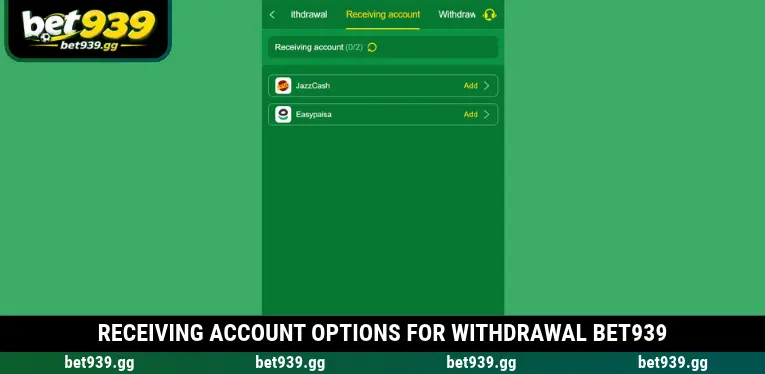
The Receiving account section at BET939 displays JazzCash and Easypaisa, each with an Add button. When using Withdrawal BET939, players in Pakistan should check the choices in this section rather than assuming that every method available for deposits is also available for receiving withdrawals.
| Receiving account | Selection and verification |
| JazzCash | Select Add beside JazzCash and enter the details requested by the form. Compare the information with your receiving wallet before completing the process; checking the payment method’s name alone is not enough. |
| Easypaisa | Select Add beside Easypaisa to provide the corresponding account information. Review the details carefully and confirm that the account has been recorded before returning to the withdrawal request. |
Managing Your Password for Withdrawal BET939
The password used for Withdrawal BET939 is authentication information established for the withdrawal function. The interface includes setup and confirmation fields, together with visibility icons. Check the entries privately so that other people cannot see the information, particularly when using a shared screen or device.
If you cannot remember the password already established, contact BET939 about the appropriate procedure instead of repeatedly guessing. Do not assume that changing your login password also changes the withdrawal password. Follow recovery instructions only after understanding the request and confirming that you are using the correct support channel.
Checking Withdrawal BET939 After Submitting a Request
After submitting Withdrawal BET939, read the displayed status or message and retain the request reference if one is provided. Pressing Confirm withdrawal does not itself prove that funds have been transferred. Check the platform’s response and the corresponding incoming transaction in your receiving wallet.
If the money has not arrived, compare the time, amount and receiving account before contacting support. BET939 needs information relevant to the situation to investigate. Avoid assuming a completion time or submitting an identical request while the outcome of the earlier transaction remains unclear.
Common Situations to Check Before Submitting
If Withdrawal BET939 cannot proceed, review missing information and any message currently displayed. BET939 separates password setup, receiving accounts and withdrawal amounts into different areas. Identifying the unfinished stage helps you check the specific issue rather than treating every difficulty as the same problem.
| Situation | What to check |
| A password setup message appears | Complete Withdrawal Password and its confirmation field. Do not continue attempting to submit a transaction while the required setup remains unfinished. |
| The two password entries differ | Compare the setup and confirmation entries. Use the visibility icons when necessary, while keeping the information hidden from other people. |
| No receiving account has been added | Open Receiving account, choose a method and add the requested details. Check that the information has been recorded before entering an amount. |
| Withdrawal Amount cannot be entered | Review the requirement to add a receiving account and any related instructions. Do not assume a technical error when required information is still missing. |
| The confirmation button is unavailable | Check the receiving wallet, password setup, amount and displayed conditions. If the reason remains unclear, retain the message and contact support for clarification. |
Practical Precautions for Protecting Your Withdrawal
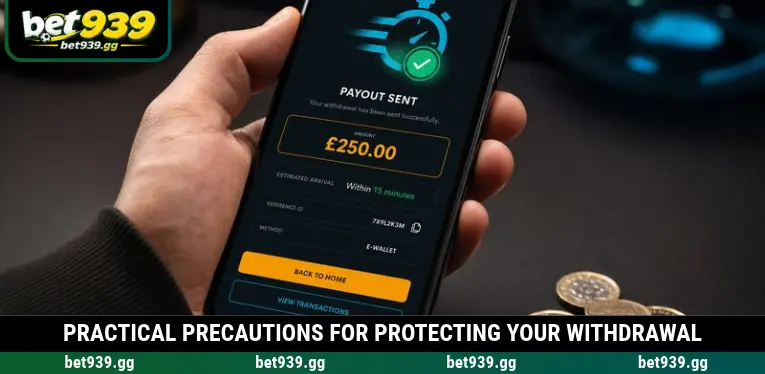
Completing Withdrawal BET939 includes protecting authentication information and checking transaction details before every request. BET939 encourages members to manage their receiving wallet, device and password carefully, particularly when using shared equipment or making changes to the account that will receive funds.
- Use a wallet you control: Check your access to the receiving account and its registered details. If the wallet holder’s information differs from the member account, ask about the applicable requirements before submitting a withdrawal.
- Keep your withdrawal password private: Do not give it to another person to operate the account for you. You do not need to include the complete password in a support conversation to describe a problem.
- Review the destination before each withdrawal: Check more than the JazzCash or Easypaisa label. Read the receiving details again, especially if account information has changed, to reduce the risk of selecting an unintended destination.
- Retain information for reconciliation: Record the time, amount and request reference if available. When sharing an image, keep the details needed for checking the issue while concealing sensitive information unrelated to the enquiry.
- Contact the correct support channel: Use the assistance icon in the withdrawal area or a contact option provided by BET939. Do not send additional money to someone outside the platform who promises to release a transaction.
Conclusion
Withdrawal BET939 should follow password setup and a review of the receiving account. BET939 encourages players in Pakistan to check the wallet, amount and transaction status while keeping authentication details private. Follow the withdrawal instructions, review the applicable conditions and confirm only when the information is correct; if a message is unclear, contact support before submitting another request.

Maya Ali is a lead gaming strategist and sports analyst at BET939, specializing in cricket exchange betting, live casino strategies, and slot games. Her guides provide Pakistani players with safe Easypaisa and JazzCash transaction tips alongside actionable betting insights to elevate their overall gaming experience. Follow her latest articles on BET939 to play smart, stay ahead of the game, and maximize your winning potential.